How do I talk to other members?
Talking to other members is easy. after logging in, search for somebody to click with and when you find that special somebody open their profile by clicking on "view profile" Inside their profile you will find a message box where you can send them a message. It's that easy! Also in your mailbox you will find a spot to send a message to somebody who has already mailed you or somebody you have already mailed. |
How do I remove my profile?
We are sorry to see you go, but if you must then so be it. Removing your profile is as easy as signing up. On the left in the toolbar is an option to edit your visibility. Once you select "my profile is not visible" radio button, you profile will be removed. Please note that we are growing and are working with a big company to hopefully become the largest internet dating community on the internet. Thank you for taking the time to become a member! |
|
| General Guidelines for your username |
| unacceptable content for your username: |
| 1. |
Abusive language, vulgarity, racism, illegal activity |
| 2. |
Any direct contact information, including email addresses, URL's, ICQ/instant messenger IDs, phone numbers, full names, addresses |
| 3. |
Unauthorized use of copyrighted or trademarked material
Business or political advertisements or solicitations |
| 4. |
Material that exploits or solicits personal information from individuals under the age of 18 |
| 5. |
Overt solicitation for sex or descriptions of sexual activity, anatomy, etc. |
| 6. |
No special characters are allowed. If you do put these characters in your username, they will automatically be removed.
spaces, underscores and dashes are ok. |
| |
` ~ ! @ # $ % ^ & * ( ) + = \ { } [ ] : ; ' " , < . > / ? |
|
Personality Compatibility
This is a graphical representation of what we feel is your best match according to your personality. A bar chart shows you a percentage based from 0 to 100 of how compatible you might be to another person. |
Last Login
This is the date that the current profile last logged in. |
Last Viewed
This is the date that you last clicked the current profile to view their details |
Spam Rating
"Unsolicited e-mail,
often of a commercial nature, sent indiscriminately to multiple mailing lists,
individuals, or newsgroups; junk e-mail."
The spam rating was created as
a warning device to our members who might encounter a profile on our site who's intent
is malicious. These profiles soul purpose is to get you to go to another site
and pay a fee for something that you do not want. We have included the spaminator
as a means to avoid profiles that may solicit this type of spam. |
|
Invite a friend and help us help you!
Can't resist our site. Want to tell all of your friends how we're the only FREE internet dating site on the planet? Send everyone you know an invitation to join Click Romance now! They'll enjoy all of our useful features such as FREE messages to all members and matches including location and personality.
We are working on making it possible for other members to see your list of friends and for you to see theirs.
Inviting people is completely optional, but we thought it would be nice if you could join us in smashing the corporate giants that charge for this sort of thing.
To get started, go to "my invites" on your home page and invite someone today! |
|
| With the recent and ongoing issues with spam and filters, we have done a little homework for you to make sure that you do not lose any mail from CaffeineLounge To setup your email to accept mail from us follow the easy steps below! |
AOL Mail
MSN Mail
Yahoo! Mail
Hotmail
|
| 1: Never hit the �Report Spam� button (figure 1) . Hitting this button may prevent you from getting email from all members who contact you. |
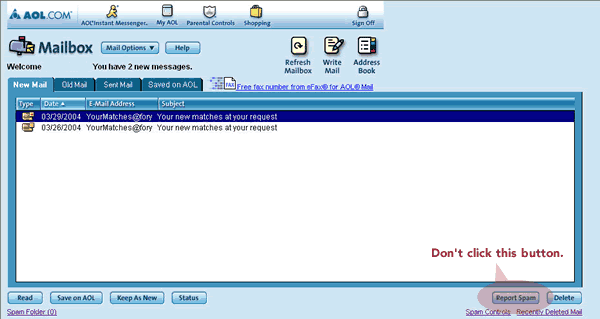
If you hit the �Report Spam� button by mistake, please take the following steps to make sure you continue to get your email.
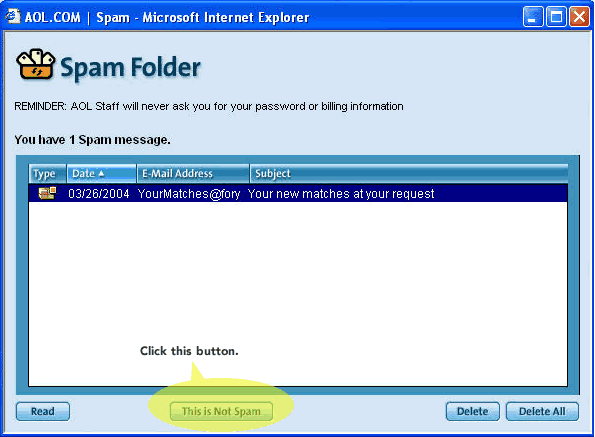
Access the �Spam Folder� in the lower right�hand corner of your mailbox.
- Click on the CaffeineLounge email that you mistakenly reported as spam in the spam folder (figure 2) .
- Click on the �This is not Spam� button at the bottom of the spam folder.
|
Please complete these simple steps to make sure you receive all of your CaffeineLounge emails. You don't want to miss out!
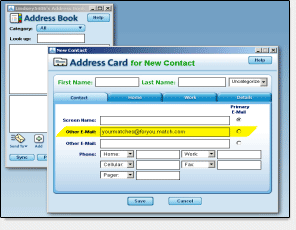
STEP TWO: Add CaffeineLounge email addresses to your AOL Email Address Book.
Starting from your AOL Homepage,
- Under Mail in top left corner, click Read
- Under Mail Options pull down to Address Book
- Click Add
- Under Primary Email Address, select other email, then type
@caffeinelounge.com (figure 3)
- Click Save
Emails from these addresses will go to your AOL inbox.
|
STEP THREE: Make sure emails sent to you by your friends at CaffeineLounge are not automatically deleted.
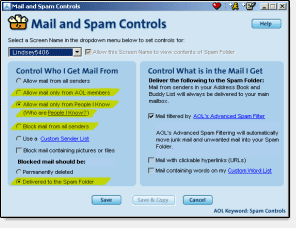
- Under Mail Options pull down to �Block Unwanted Mail�
- Choose one of the filters under �Control Who I Get Email From�
We recommend you leave the setting at �Allow mail from all senders.� No other action is required.
If you choose anything OTHER THAN �Allow mail from all senders,� follow these additional instructions:
- Under �Blocked mail should be� select �Delivered to Spam Folder� (figure 4)
- Click Save
ALL emails sent to you by your friends at CaffeineLounge will go into your �Spam Folder� INSTEAD OF your inbox.
Please note: This is only recommended if you choose any setting other than �Allow mail from all senders.� |
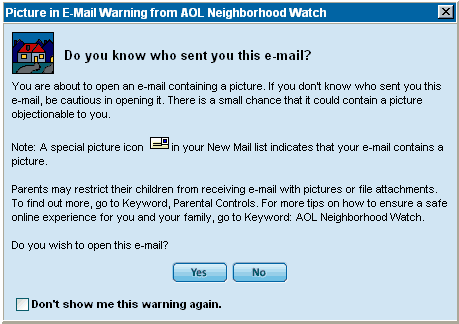
CaffeineLounge email may contain pictures of people you've expressed interest in learning about. Make certain that you click "Yes" ( figure 5) to see mail from CaffeineLounge.
|
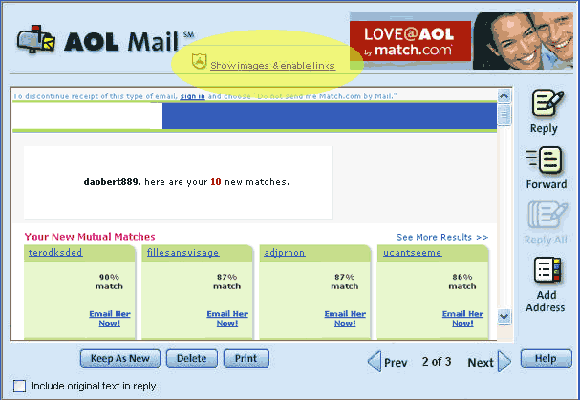
If images do not appear in your email click the "Show images & enable links" ( figure 6) at the top of your mail.
|
|
|
